


Start Solids & Baby Recipes
4.013.00 Reviews
App Specs
- Version
- 2.8.1
- Updated On
- License
- Free
- Downloads
- 100,000+
- Developer
- Wiserapps Software
- Categories
- Parenting
- Platform
- Android
Screenshots
 Analysis by AppCompare
Starting solids can turn ordinary mealtimes into a stream of small decisions: what to offer, how to prepare it, and how to remember what your baby tried yesterday. Start Solids & Baby Recipes is a parenting app from WiserApps that brings food ideas, recipes, and tracking into one place. I can see the appeal in the first week, when every new texture feels like a question, but its lasting value depends on whether it fits into a family’s routine rather than becoming another task to maintain.
Why the first week feels easier
The app is free to download, with in-app purchases ranging from $3.99 to $24.99 per item. It has an Everyone age rating, a 3.5 average from 447 ratings, and more than 100K installs. Those figures give a useful sense of its reach, though they don’t tell me whether its approach will suit every household. The current version is 2.6.3, and it runs on operating systems from version 7.0 onward.
What makes a guide like this useful at the beginning is not simply a large collection of food ideas. It is having a place to consult when you are unsure how to move from milk feeds to first tastes, and then from smooth foods toward more texture. The app’s recipes and trackers are aimed at that transition. I would treat its guidance as a planning aid, not as a substitute for advice from a qualified health professional, especially when a baby has individual feeding or medical needs.
How the routine holds up over time
I’d judge the app’s staying power by whether it keeps helping after the first burst of recipe browsing: a brief, repeatable food log and a few useful meal ideas may be enough to justify returning, while a detailed daily routine can quickly feel like maintenance. I’d let the tracker earn its place only when it answers a real question, then consider how that habit fits alongside the rest of the household’s feeding routine.
Getting Started: The Basics
Once you open the app, you're greeted with a wealth of information tailored to your baby’s age and dietary needs. The app kicks off by educating you about when and how to start solids, which is essential for any new parent. It’s packed with expert advice and tips, giving you confidence as you embark on this culinary journey with your baby.
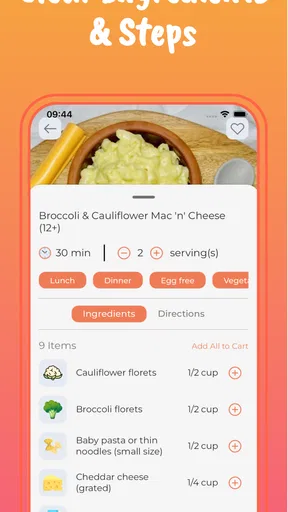
One feature I found incredibly helpful is the step-by-step guide on preparing baby food. Whether you’re a culinary wizard or someone who’s more comfortable with takeout, the app breaks down recipes into simple, actionable steps. Plus, it covers everything—from purees to more textured meals as your baby grows.
Recipe Heaven: A Treasure Trove of Ideas
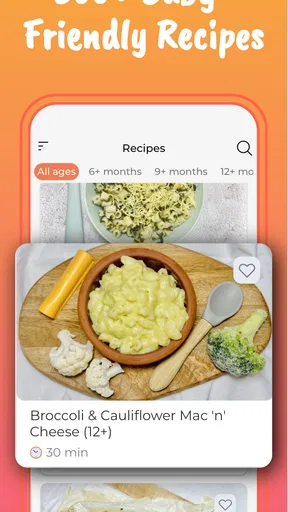
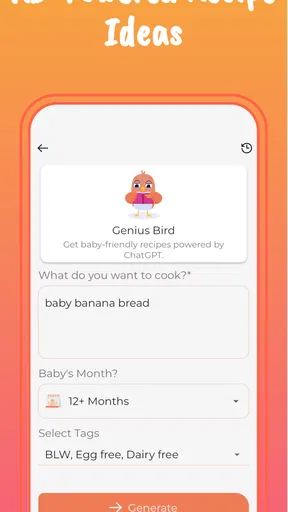
The recipe section is where Start Solids & Baby Recipes truly shines. It’s like a Pinterest board but for baby food. You’ll find a variety of recipes that cater to different stages of your baby’s development. Each recipe is categorized by age, making it super easy to find exactly what you need without any hassle.
Worth Reading Before You Choose

Flipboard Shows What News Apps Must Do Beyond the Feed

Switching to Android Auto Means Rethinking Your Driving Routine

Google Calendar Makes a Crowded Week Easier to Manage

Ludo King Makes the Most of the Minutes Between Plans

Baby Panda World Brings Quick Play to Modern Phones, but Its Game Library Feels Busy

ESPN’s Live Game View Makes Following Close Games Easier
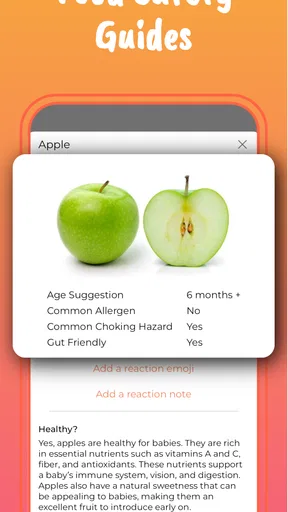
From simple fruit and veggie purees to more adventurous combinations like quinoa and sweet potato, there’s something for every little palate. And let’s be real, trying out new recipes can be a fun way to get creative in the kitchen. Plus, the app provides nutritional information, so you know exactly what nutrients your baby is getting.
Making the tracker useful rather than burdensome
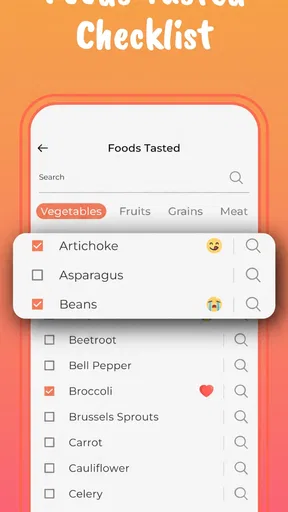
Food tracking has more value when it answers a real question than when it becomes a perfect diary. A practical approach is to record a new food and any noticeable reaction, then use that history when planning what to offer again. If you try to document every bite, preparation detail, and family preference, the extra bookkeeping can crowd out the actual meal. I’d keep entries brief and consistent; a small record you maintain is more useful than an ambitious log abandoned after a few days.
That distinction matters for parents sharing care. If one adult offers lunch and another handles dinner, a tracker can help them compare notes instead of relying on memory at the end of a tiring day. It is also a way to notice what has already been introduced before shopping or cooking. For suspected allergies or concerning symptoms, though, an app log is only a record to discuss with a clinician, not a way to diagnose or manage a reaction on its own.
Personalized Meal Plans
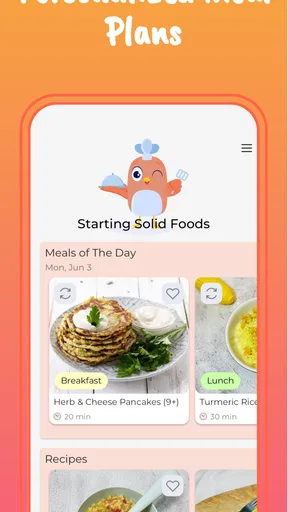
Another gem is the personalized meal planning feature. You can create a meal plan tailored to your baby’s specific needs and preferences. This is a huge time-saver, especially when juggling the endless tasks of parenthood. The app also sends you reminders, ensuring you never miss a meal preparation.
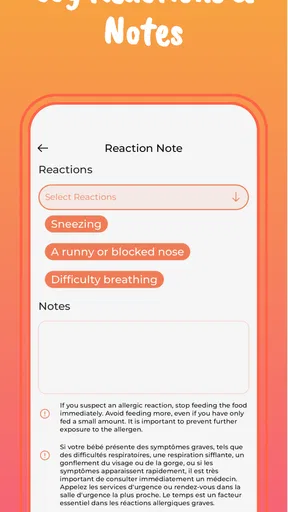
What’s more, the app allows you to document your baby’s reactions to different foods. This not only helps in identifying allergies early on but also keeps track of what your baby loves or, well, not so much.
A realistic weeknight test
Imagine getting home with a hungry baby and very little time to think. Instead of scrolling through broad recipe searches, you can look for an age-appropriate idea, check its preparation steps, and decide whether the ingredients suit what is already in the kitchen. After the meal, a short note about what was offered and how it went can make the next choice easier. That is the kind of ordinary, repeatable workflow where the app seems most useful: it joins planning, cooking, and remembering without needing to replace the family’s whole feeding routine.
The trade-off is that a plan is only helpful if it matches the food you actually have time and energy to prepare. I would use meal planning as a loose set of prompts rather than a strict calendar. If a recipe requires a shop or a separate cooking session, it may be less practical than adapting a familiar family meal safely. The app can offer structure, but the parent still has to judge what is feasible on a particular day.
Month-to-month value beside familiar alternatives
Compared with searching the web each time, a dedicated solids app can reduce the number of separate pages and notes involved: recipes, feeding ideas, and a record of foods tried sit within the same parenting-focused experience. Compared with a notebook or a basic notes app, it offers more structure around age-oriented recipes and meal planning. Those alternatives may still be better for someone who wants complete control, dislikes reminders, or prefers to keep family information in a simple personal record.
I would not expect a recipe app to settle every feeding question. A pediatrician or dietitian is the better source when the decision involves a medical concern, a growth issue, or specific dietary restrictions. A general search can also be more useful when you need to compare several perspectives or check a particular ingredient. The app’s strength is convenience for day-to-day organization, not replacing professional guidance or the judgment that comes with knowing your own child.
Its recurring value will depend on whether the recipes continue to give you ideas after the novelty of trying the app wears off. Parents who like rotating foods and planning ahead may return to it as their baby develops. Those who repeat a small set of meals, cook intuitively, or already have a reliable system may find that the app is most useful briefly at the start and less necessary later. That is not a flaw so much as a question of fit.
Community and Support
Parenting can feel isolating, but with the app’s community feature, you’re never alone. You can connect with other parents, share recipes, and swap tips. It’s like having a support group at your fingertips. Engaging with other users adds a layer of comfort, knowing you’re all in this together.
And if you ever find yourself stuck or in need of advice, the app offers expert support. Whether it’s nutritionists or pediatricians, you can get your questions answered without having to scour the internet.
Where maintenance and fatigue can creep in
Any app built around tracking asks for repeated attention. The friction may not come from a complicated screen; it can come from remembering to open it after a meal, adding an entry while a baby needs attention, and keeping a plan current when the day changes. I would start with only the parts that solve a genuine problem—perhaps browsing recipes first, then using the tracker if remembering introductions becomes difficult. There is no need to turn every feature into a daily obligation.
Reminders can help when they prompt a useful preparation task, but they can also feel like one more notification in an already busy day. If they start to create pressure, scale back how much you rely on the plan and use the app when you choose. Likewise, community advice can be reassuring, but another family’s experience is not automatically right for your baby. I’d use peer suggestions for ideas and leave health decisions to qualified professionals.
The free starting point makes it easier to see whether the workflow suits you before spending money. Since some items are offered as in-app purchases, I’d first work out which part of the routine I expect to use regularly rather than paying simply because more content is available. If recipes are the main draw, assess whether they are genuinely changing what you cook; if the tracker is the useful part, focus on whether you can keep it up without effort becoming disproportionate.
Who will get the most from it
I think the strongest match is a caregiver who wants gentle structure during the move into solids: someone who benefits from age-organized recipe ideas, prefers having meal planning and food notes together, or shares feeding duties with another adult. It may also help a parent who feels overwhelmed by scattered online advice and wants a more focused place to begin exploring options.
It is less compelling for families who already have trusted guidance and a simple routine that works, or for anyone who wants a specialist medical tool rather than general parenting support. It may also frustrate a minimalist who would rather keep a handwritten list than maintain an app. Before making it part of the household routine, I would ask one practical question: does it make the next meal easier to decide on, or does it add another record to keep current?
Final Thoughts on Start Solids & Baby Recipes
All in all, Start Solids & Baby Recipes is a must-have for any parent embarking on the solid food journey. It’s packed with features that simplify the process, making it less intimidating and more enjoyable. From its vast array of recipes to personalized meal plans and a supportive community, it’s an all-in-one tool that makes feeding time a breeze.
If you're ready to take the plunge into the world of baby foods, give this app a try. It’s like having a culinary guide and supportive friend all wrapped into one handy app. Happy cooking and feeding!
Pros
- Easy-to-follow recipes for busy parents.
- Nutritional info provided for each dish.
- Customizable meal plans for babies.
- User-friendly interface with clear navigation.
- Offline access to recipes for convenience.
Cons
- Limited recipe variety for older toddlers.
- No option for allergy-specific filtering.
- Requires in-app purchases for more features.
- Occasional app crashes reported by users.
- Lacks community or forum for parent interaction.
FAQs for Start Solids & Baby Recipes
What is Start Solids & Baby Recipes, and how does it work?
Start Solids & Baby Recipes is an app designed to guide parents through the introduction of solid foods to their babies. It offers a variety of baby-friendly recipes, nutritional information, and feeding tips. The app provides step-by-step instructions and allows you to track your baby's food preferences and any allergies.
What age group is this app suitable for?
The app is tailored for parents of infants starting the transition from milk to solid foods, typically around 6 months of age. It provides guidance for introducing solids safely and healthily, ensuring that the recipes align with a baby's developmental stage and nutritional needs.
Does the app offer personalized meal plans?
Yes, Start Solids & Baby Recipes offers personalized meal plans based on your baby's age, dietary needs, and any allergies. The app also allows you to customize the meal plans to suit your preferences and your baby’s reactions, making it easier to manage their diet effectively.
Are the recipes in the app approved by nutritionists?
The recipes in Start Solids & Baby Recipes are curated and approved by certified nutritionists, ensuring they meet the health and safety standards necessary for infants. This provides parents with the confidence that the meals are nutritionally balanced and appropriate for their baby's development.
Is the app available for both Android and iOS devices?
Yes, Start Solids & Baby Recipes is available for download on both Android and iOS platforms. You can find it on the Google Play Store for Android devices and the App Store for iOS devices, making it accessible to a wide range of users looking for baby food guidance.


